
Introduction
Vaillant Arotherm Basic Hot Water Settings are a bit baffling to be honest. It took me quite a while to get my head around them coming from a combi boiler.
Unlike a combi boiler, which can generate instant and almost limitless hot water, a heat pump needs to preheat water and, as such, needs somewhere to store that. Hence the need for a hot water cylinder (or thermal store).
And because the heat pump can’t create as much instant power as a gas boiler, reheats can take longer which means we have to be mindful of the settings we choose to ensure we still have enough hot water when we need it.
In this article we’ll take a look at the settings for Domestic Hot Water on a Vaillant Arotherm, what they all do, and some recommendations to get you started.

This article is part of my wider series of Vaillant Arotherm guides, aiming to demystify the settings that matter most for efficiency and comfort.
Whilst this article is about hot water settings and there is a matching guide for Vaillant Arotherm Basic Heating Settings.
Vaillant Arotherm Basic Settings
Table of Contents

Heat Pump Performance for Normal People
Want to understand how a heat pump really performs in everyday life? I’ve put together a plain-English guide on heat pump performance for normal people, covering how they work, why they feel different to gas boilers, and the simple setup tweaks that make them both efficient and comfortable.
Heat Pump Performance for Normal People
How a Hot Water Cylinder Works with a Heat Pump
When you draw off hot water (take a shower, etc.), hot water comes out of the top of the cylinder, then cold water comes in at the bottom which starts to replace the lost hot water. So as you use hot water, the overall temperature of the water in the cylinder starts to drop as that mixing of hot and cold occurs.
When reheating the hot water, the heat pump transfers thermal energy through the pipework and an indirect coil inside the hot water cylinder (as per the diagram below).
So the heat pump sends hot water from the outside unit, through the coil inside the cylinder, which transfers the heat into the usable water inside the cylinder.

Image courtesy of Mixergy from their article ‘How Mixergy Cylinders Work With a Heat Pump‘.
Hot Water Technical Interlude
Technically, how a Vaillant heat pump heats hot water is a straightforward affair.
The diverter valve moves from heating across to hot water and the water heating process begins.
The Arotherm chooses the compressor speed it’s going to use depending on the hot water mode chosen. (See Arotherm Plus Hot Water Modes for more info on the modes available).
It then uses that same compressor speed throughout. There is no compressor modulation.
The water heating cycle begins, and the initial flow temperature that the reheat cycle starts with is the temperature of the water in the cylinder that is around the coil at that time, i.e. as cold as it finds it. There is no “fixed flow temperature” when heating hot water on a Vaillant Arotherm.
As the reheat process continues, the flow temperature coming from the heat pump rises in line with the increasing hot water temperature inside the cylinder, being transferred from the heat pump via the coil (or plate).
The reheat continues and only stops heating when the temperature probe inside your cylinder reaches the target temperature.
This means that the heat pump does not care what the starting temperature is. The process just starts at whatever temperature it finds, raising the temperature incrementally until the target is reached.
If you look at a snapshot from my Open Energy Monitor setup you can see this in action.

This reheat started at around 20°C and finished just over 50°C.
Here is a direct link to that hot water run via my Open Energy Monitor portal: https://emoncms.org/energystatsuk?mode=power&start=1759449250&end=1759453890
TL;DR: The reheat of the cylinder starts, it reaches the target, and then stops.
Hot Water Takes Priority
Remember that your heat pump system runs in hot water priority mode. If a call to reheat the hot water is made (manually or via a schedule), then space heating of the house is paused until the hot water cycle finishes.
Displaying the Current Hot Water Temperature
Use the Sensocomfort controller and navigate to this menu item
Control → Domestic Hot Water → DHW Temperature → Current DHW temp
This will show the current temperature being read by the probe that is inserted into the cylinder.
ALERT: this is not always the temperature of the water available at the tap.
The temperature being read depends on where the temperature probe in your cylinder is located. If the probe is fitted halfway up the cylinder, the water above the probe will usually be hotter, because there’s hot water at the top of the cylinder and cold comes into the bottom.
So for example, if the controller shows 40°C (middle of the cylinder), the water leaving the top of the cylinder could well be higher.
Ideally, the location of the probe would be about one-third of the way up the cylinder.
The temperature read by the probe is what decisions about whether to start or stop hot water reheats are based upon.
How to Choose Your Target Hot Water Temperature
Use the Sensocomfort controller and navigate to this menu item
Control → Domestic Hot Water → DHW Temperature
A sensible setting for starters is probably 50°C. It’s a good balance between usable water and performance. This sets the Vaillant hot water temperature setting.
Remember, depending on the location of the temperature probe, the water above it could be hotter.
So it’s really hard to give a definitive recommendation for DHW temperature target due to the multitude of different cylinder and sensor locations.
What temperature you choose depends on the size of your cylinder, the amount of hot water required, temperature sensor placement, efficiency targets and a whole host of other factors.
Read the article “Hot Water Cylinder Sizing and Mixing” about how a higher target temperature can give more usable water.
Setting the Hot Water Control Mode
You can choose this via:
Control → Domestic Hot Water
-
Off
-
Time-Controlled
-
Manual
Off: No hot water reheats will take place at all.
Time-Controlled: Water reheats can only occur in scheduled times as long as hysteresis is triggered.
Manual: Reheats can occur at any time as long as hysteresis is triggered.
More on the role of hysteresis later in the article.
Note: The “control mode” selected here is not to be confused with the hot water modes (Eco, Normal, Balance and Sweet Spot) that are available determine the speed of the compressor. Read more information about those modes and how to select them via “Hot Water Modes Explained“.
Starting an Instant Reheat (Hot Water Boost)
Control → Hot Water Boost → Yes
This is a manual way of forcing a water reheat up to the target temperature.
Regardless of any schedule, the heat pump will just start heating water.
You can quit out of the boost by pressing the back button on the SensoComfort controller.
Always-On Hot Water Schedule – No Smart Tariff
The simplest way to configure hot water is to have an “always on” schedule and allow the heat pump to start a reheat when a certain amount of hot water has been taken.
This is the recommended way if you are on a flat, single-price tariff and you always want your hot water to reheat once you have used some.
Setting a Hot Water Schedule
To set a schedule:
Control → Domestic Hot Water → DHW Temperature → Domestic Water Weekly Planner
For this “always on” example we are going to set 00:00 to 23:50 for all 7 days of the week.
Note: The times available for selection are in 10 minute blocks.
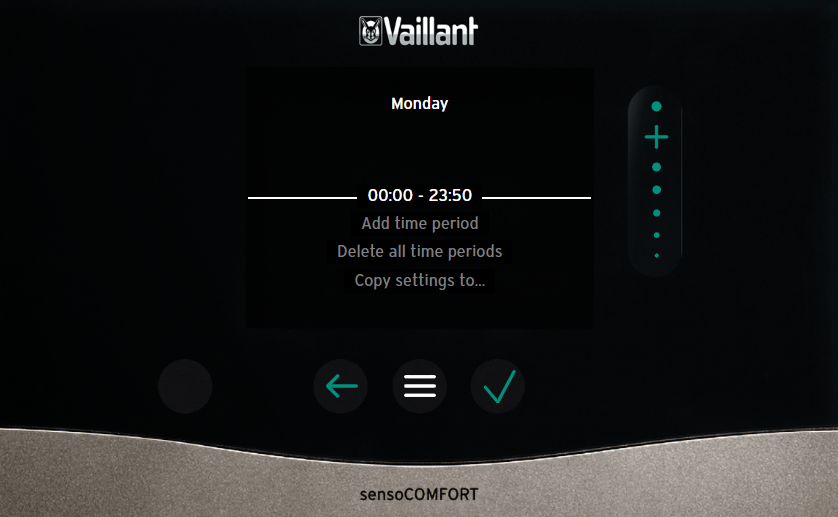
Once you’ve set this for one day, use the “copy settings to” option to replicate it across the whole week.
This means that the heat pump is capable of starting a hot water reheat any 10 minute slot of the day, if triggered.
This same behaviour can also be achieved by changing the hot water mode to “Manual”.
But I thought it would be useful to see both ways of doing it.
Note: you can create up to three separate hot water schedule blocks.
What Is Cylinder Charging Hysteresis?
Earlier we introduced:
-
Current DHW Temperature (temperature read by the probe in the cylinder)
-
Target Hot Water Temperature (how hot you want the heat pump to heat the water to)
Let’s add into the mix the setting that triggers hot water runs: Cylinder Charging Hysteresis.
You can see what this is set to via this menu item:
Settings → Installer Level → 00 → Installation Configuration → Domestic Hot Water → Cyl Charge Hyst.
Confusingly, Cylinder Charging Hysteresis is shown in Kelvin. Kelvin and Celsius can be used interchangeably here. So 1K is 1°C and 10K is 10°C.
What Does Cylinder Charging Hysteresis Do?
The heat pump constantly monitors the difference between the current DHW Temperature (via the temperature probe) and the Target Hot Water Temperature you have selected.
When you draw off hot water (take a shower, etc.), hot water comes out of the top of the cylinder and cold water comes in the bottom, which starts to replace the hot water. As this happens, the overall temperature of the water in the cylinder starts to drop as the mixing of hot and cold occurs.
As this happens the temperature probe starts to notice and record this temperature drop.
Once the difference between these two numbers (current and target) exceeds the number in Cylinder Charge Hysteresis, then it’s possible for a hot water reheat to start.
Note: Hysteresis only needs to be exceeded by 0.1°C to trigger.
Hysteresis Example
- Target Hot Water Temperature: 55°C
- DHW Temperature: 49°C
- Cylinder Charge Hysteresis: 5K
Because the difference is 6°C (or 6K), then it is possible to start a hot water reheat.
I’ve said twice that it is possible for the heat pump to start a reheat once hysteresis is exceeded. This is because a water reheat can only start within a defined schedule.
In our case, in the example where we have set the schedule to be 00:00 to 23:59, it’s possible to always start a reheat once the hysteresis is reached.
REMINDER: Two things need to be true to automatically start a hot water re-heat:
- Be within a schedule (or manual mode).
- Difference between current temperature and target temperature needs to exceed hysteresis (only needs to by 0.1°C).
What to Set Cylinder Charge Hysteresis To
As we’ve talked about earlier, the location of the probe in your cylinder and size of your cylinder makes this very much an “it depends” answer.
I think 7K is a good starting point for most people if the temperature probe is towards the top of their cylinder.
This means that heating will kick in once the temperature drops 7°C as read by the probe.
As mentioned in the Golden Rules article, if your probe is lower in the cylinder or you want to make your hot water runs more efficient, it can help to increase the hysteresis.
Warning: Avoid setting it too low. The water in your cylinder naturally cools through the day, and a small hysteresis value can cause unnecessary mini reheats just to make up for those standing losses. As shown in the Golden Rules, these top-up cycles aren’t great for efficiency.
The flip side is that if you set the hysteresis too high and you’re in a low-use household, you might only draw off a small amount of hot water. That means the temperature drop isn’t large enough to trigger a reheat when the schedule comes around, even though it’s allowed to.
Recommending a single “best” hysteresis value is tough, because there are so many variables at play.
Time of Use Hot Water Schedule – Reheat When Cheaper
If you are on a smart tariff it makes sense to schedule your hot water runs in the cheaper periods available.
If you are unsure what smart or time of use tariffs are, please read our What Are Time of Use Tariffs guide:
We also took time of use tariff analysis one stage further and looked at the various Octopus smart tariff offerings and which could be best for you depending on the renewable kit you have via this Best Heat Pump Tariff article.
If you do decide to change your supplier to Octopus Energy, you can claim £50 free credit when switching using my referral link. Thank you if you decide to do that.
As we proved in the Golden Rules research, a cheap off-peak rate will make your hot water runs cheaper than almost any tweaking of settings and chasing performance. Yes, combine the two, but that cheaper off-peak period almost always wins.
Example: Hot Water Reheats on Octopus Cosy Tariff
Octopus Cosy is the heat pump tariff offered by Octopus Energy.
It has three cheaper periods each and every day:
-
Off-peak windows: around 50% cheaper than the standard day rate
04:00–07:00
13:00–16:00
22:00–00:00 -
Standard rate: applies to all other hours outside off-peak and peak
-
Peak rate: roughly 30% higher than the standard rate, between 16:00–19:00
It makes sense to move the hot water runs into those cheaper slots.
I think it probably makes sense for us to use the early AM slot and the early PM slot. That way we can have a full cylinder of hot water as we wake up and then again when we get home from school and work.
It’s unlikely you’re going to use loads of hot water after midnight and before 4am.
So we’d go into the settings and set up those two time slots:
Control → Domestic Hot Water → Domestic Hot Water Weekly Planner
- 04:00 to 07:00
- 13:00 to 16:00
As we talked about in the “always on schedule” example, a hot water reheat will only start if two things are satisfied:
-
We are within a schedule period (or manual mode)
-
Cylinder Charge Hysteresis is exceeded
If both those things are true, then a reheat will start.
So if you don’t draw off any hot water one evening and the hysteresis difference is only 3°C (DHW Temperature minus Target Temperature), then the hot water cycle would not start.
Another thing to watch with the time-of-use or time-block schedule approach is how it interacts with hysteresis. If you use a lot of hot water, say after a long bath, the cylinder temperature might drop well below the hysteresis trigger. But if you’re outside a scheduled reheat window, the system won’t top it up until the next block starts, no matter how cold the cylinder gets.
That’s not necessarily a problem if your schedule is well-timed, but it’s worth keeping in mind, especially on tariffs with long gaps between cheap periods.
If you find yourself doing manual boosts, you may need to reconsider your target temperature and schedule frequency.
Example: Hot Water Reheats on Solar PV
If you have solar it makes sense to set a schedule for mid-afternoon each day, say noon to 2pm.
That way, you’re most likely to be generating from the rooftop at those times, so can help cover or contribute to the electricity used by the heat pump heating the water.
It’s much better to do the hot water run via the heat pump and target around 300% efficiency than it is to use a solar diverter like an Eddi or iBoost, which will only get you 100% efficiency.
You could also be much better using the extra surplus in your battery or selling it back to the grid.
How Hot Water Runs Finish
There are three ways the hot water cycle will finish:
-
The temperature probe in the cylinder reaches the target temperature
-
The end time of the hot water scheduled time is reached
-
The maximum cylinder charging time is reached (default 90 minutes)
DHW Temperature Reaches Target Temperature
The hot water reheat will stop when the temperature probe reaches the target temperature.
End of Schedule Reached
Regardless of what stage the hot water reheat is at, if the end of the timed schedule is reached then the reheat will stop and the heat pump will return to heating.
This could leave you with less hot water than you hoped for.
Lots of factors can play into why hot water runs take a long time:
-
Amount of water being heated
-
Target temperature
-
How empty the cylinder is to start with (hysteresis)
-
Outside temperature (the heat pump produces less heat on colder days)
-
Hot water mode (Eco mode is way slower than Normal mode)
So always ensure your schedule is long enough to heat the amount of water to the temperature you require. You can use the calculator at the end of the article as a guide.
Maximum Cylinder Charge Time
Because the heat pump runs in hot water priority mode, whenever the heat pump is heating hot water it’s not heating the house.
To stop this being a problem there are two settings to help:
-
Max. cyl charging time
-
Cyl charge anti-cycle time
Both can be changed via:
Settings → Installer Level → 00 → Installation Configuration → Domestic Hot Water
Max. Cylinder Charging Time
This setting defines how long the heat pump is allowed to reheat the water for, in one go. I would recommend you put this at 120 minutes.
It is also possible to turn this off so there is no limit. This could be useful in certain situations (big cylinder, small heat pump, Eco mode), as you might encounter a problem where your hot water run takes longer than two hours.
You can read about my adventures and struggles with Eco Mode in my article “The Problem With Eco Hot Water Mode“.
Cyl Charge Anti-Cycle Time
This setting defines how long the heat pump will need to wait before allowing the next hot water reheat.
You might put this setting to 60 minutes so that you allow the heating to come on and warm the house before trying to do a hot water reheat again.
The maximum settings on both these options is 120 minutes, so two hours.
Cylinder Charging Offset
In the manual of the SensoComfort controller you will see the description of Cylinder Charging Offset listed as follows:
“Desired temperature + offset = flow temperature for the domestic hot water cylinder.”
So you would assume that whatever you set the offset to would be added to either the end target temperature or the flow temperature when heating.
The reality is that on a heat pump, Cylinder Charging Offset does nothing.
It’s just another red herring of a setting in the SensoComfort manual. Remember, the SensoComfort controller can also be used on a gas boiler, so some things just don’t apply.
You can set the offset to 0K or you can set it to 20K and there will be no difference in your hot water runs. Yes, there are odd comments floating around internet forums that it “should” do something and stories that it did do something one Thursday in July.
But thanks to folks who run Open Energy Monitor kit on their heat pumps with a ton of sensors in place, we’ve been able to experiment with this setting to show it adds no value.
André Kühne, one of the regulars on the OEM Forum, did some systematic testing here if you’re interested:
https://community.openenergymonitor.org/t/vaillant-arotherm-owners-thread/21891/993
If you want to see what yours is set to, it’s accessible via this menu item:
Settings → Installer Level → 00 → Installation Configuration → Domestic Hot Water → Cyl Charge Offset
Anti-Legionella Protection
If you notice that your hot water temperature sometimes reads higher than your chosen target, it could be because of the Vaillant Aotherm plus legionella cycle.
The anti-legionella process can be scheduled once a week to take your hot water beyond 60°C using the heat pump.
You can choose the day in this menu item, or turn it off if not required:
Settings → Installer Level → 00 → Installation Configuration → Domestic Hot Water → Anti-legio. day
This Heat Geek article on legionella is worth a read: “Legionella and Water Temperature, What You Need to Know“.
If you decide you do need to run anti-legionella protection, you will also need to choose a time of the chosen day to complete this:
Settings → Installer Level → 00 → Installation Configuration → Domestic Hot Water → Anti-legio. time
Pick a day and time when there is little or no hot water demand, such as overnight. This avoids running the cycle when you might need hot water and also lets you take advantage of cheaper off-peak electricity if you have a time-of-use tariff.
Note: If the Absence/Holiday function is activated on the heat pump, the anti-legionella function is not carried out. But as soon as the Absence feature is switched off, the anti-legionella function will run.
What Is Circulation Weekly Planner / Secondary Return?
When you open a tap you have to wait until the hot water leaves the cylinder and arrives at the tap. If this is only a short distance, that can be pretty quick.
But if the cylinder is at the other end of the house, this could take a very long time.
The idea of a secondary return setup is that hot water is constantly sent around the house by using a circulation pump. So when the tap is opened at the other end of the house, there is already hot water waiting.
The downside of this is:
-
Electricity is required for the pump
-
Hot water is wasted just being circulated around pipework
There is a way of mitigating some of the energy use and wastage by only running this when required, using a schedule.
So maybe you only schedule the secondary return to run for a few hours in the morning and in the evening.
You set a schedule for this via the SensoComfort controller:
Control → Domestic Hot Water → Circulation weekly planner (set times)
You can check whether the pumps are running via the installer menu:
Settings > Installer Level → 00 → Installation Configuration > Domestic Hot Water
-
Cylinder charging pump: displays cylinder charging pump status (if connected)
-
Circulation Pump: secondary return pump status (if connected)
Note: The secondary return feature is something your heating engineer would have installed for you. It requires extra pipework to be run from the cylinder and around the house, as well as an extra circulation pump installed.
Recommended Settings – Recap
Let’s recap the settings we have recommended.
Control Menu
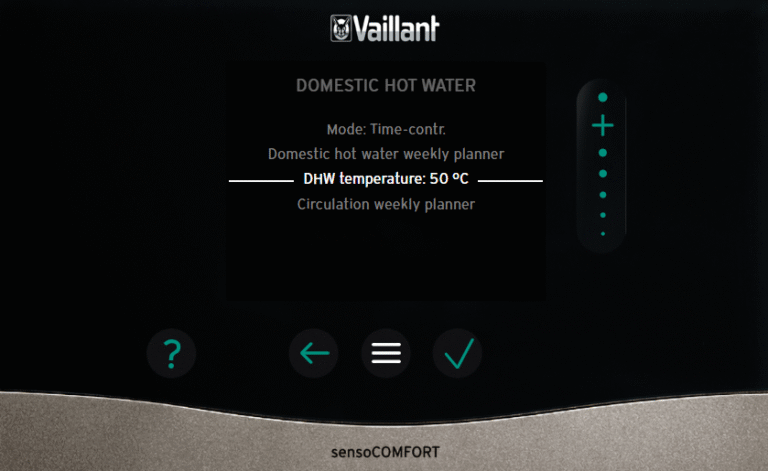
Control → Domestic Hot Water
- Mode: Time-Contr
- Domestic hot water weekly planner (choose times that suit, either all day or certain slots)
- DHW temperature: 50°C
- Circulation weekly planner (disable, unless you have a secondary return installed)
Installer Menu
Settings → Installer Level → 00 → Installation Configuration → Domestic Hot Water
- Anti-legio. day: Monday
- Anti-legio. time: 04:00
- Cylinder charging hysteresis: 7K
- Cylinder charging offset: 0K
- Max cyl charging time: 120 min
- Cyl charg anti-cycl time: 60 min

Better Hot Water Performance, Sizing and Mixing
There are five golden rules relating to hot water on a heat pump.
Four of them are related to improving performance and the fifth rule is all about cost.
The Golden Rules of Efficient Hot Water Generation with a Heat Pump
-
Reheat from as empty or cold a cylinder as possible (high hysteresis) – no quick top-ups
-
Choose the lowest target hot water temperature you can get away with
-
Use Eco Mode (or some other low compressor / quiet mode)
-
Schedule reheats when it’s warmer outside
-
The money saved by scheduling the reheats during the dip of an off-peak tariff will likely trump any efficiency gains
You can look at this Best Heat Pump Hot Water Settings article, you can see these Golden Rules in more details along with the evidence behind them.
In this Hot Water Cylinder Sizing and Mixing article we also talked about how choosing a higher temperature gives you more usable water:
So whatever you settings choose, it is all a balancing act.
Best Heat Pump Hot Water Settings (The Golden Rules)
Hot Water Modes Explained (Eco, Normal, Balance, and Sweet Spot)
Vaillant gives you three official hot water modes: Normal, Eco, and Balance. On top of those, there’s a fourth option that I’ve tested and named Sweet Spot mode, created using the Noise Reduction setting.
-
Normal Mode – fastest, least efficient. No limits on the compressor.
-
Eco Mode – slowest, most efficient. Compressor output is limited to around 50%.
-
Balance Mode – a mix of Normal and Eco. Uses the same limits as those two modes but switches partway through, so it ends up slower and less efficient overall.
-
Sweet Spot Mode – a DIY middle ground. The compressor is limited, but not as much as in Eco, giving faster recovery with only a small drop in efficiency.
See this article on Arotherm Plus Hot Water Modes for more info if you want to go deeper and how to select them.
Automate Hot Water with Havenwise
If after reading these basic instructions you are still struggling, there is another option. Havenwise is a remote optimiser that takes over the tricky decisions for you. All you do is tell it when you want hot water.
Your heat pump already needs to be internet connected for this to work, meaning you have the myVaillant app.
Havenwise can optimise hot water scheduling, heating your cylinder at the cheapest times when you integrate it with smart tariffs such as Octopus Agile, Intelligent Go and Octopus Cosy
We proved that timing hot water runs with off-peak tariffs was the best money-saving combination — see Best Heat Pump Hot Water Settings (The Golden Rules).
Havenwise can also take the hassle out of choosing the curve setting and other space heating decisions. See the Vaillant Arotherm Basic Heating Settings guide for more details.
Havenwise isn’t free, but if you’re on a smart tariff or just want your system to quietly optimise itself, it’s definitely worth a look.
If you fancy giving it a go, you can start a free trial here and see how it works in your own house.
After using Havenwise in my own house for a while I have written a comprehensive article; Havenwise Review: My Experience with a Vaillant heat pump.
Mixergy Smart Cylinder
I have found this article to be the toughest help guide I’ve written because I don’t use any of these settings: hysteresis or any of the inbuilt Vaillant hot water controls.
That’s because I have a 250L Mixergy smart cylinder which has its own app that controls all my hot water.
So writing up about these Vaillant settings all seems like guesswork, and you never seem to truly know how much hot water you have available.
The thing I really love about the Mixergy is that it tells me exactly how much water I have in percentage terms, either via the app or via Home Assistant.
And also that I know all of the cylinder is available at the target temperature. No guessing about the location of the temperature probe and how much water above the probe there is.
If my 250L says 100% at 45°C, that means 250L usable water at 45°C.
I can be down at 3% and there will still be usable water.
I tested this in a Mixergy Usable Hot Water Capacity Test deep dive article.
If you are reading this before you’ve got your heat pump, I’d certainly consider a Mixergy cylinder if you want some certainty on the amount of hot water you have.
I also wrote a deep dive here on Mixergy performance with a heat pump.

Other Hot Water Articles
Here are a couple of other hot water related articles that we haven’t covered in the main piece:
Hot Water Calculator
Enter your cold and hot water temps, the litres you’re heating, your heat pump’s power output and COP of the hot water run.
The tool calculates heat added to the water in kWh using Litres × ΔT × 0.001163, the electrical energy as Heat ÷ COP, and the time as Heat ÷ Power Output, then shows Electrical Input, Heat Output, and Time Taken (hh:mm).
Defaults are 200 L from 10°C to 50°C, COP 3.0, and 5 kW power.
COP is also checked by Heat ÷ Electrical so you can confirm the numbers.
This calculator is now available on it’s own dedicated page: Hot Water Calculator (reheat times for heat pumps).
Also visit “How Much Electricity Does a Heat Pump Use” for more a deep dive into energy usage.
Hot Water Calculator
Enter your values. The calculator assumes water is 1 kg/L and specific heat is 4.186 kJ/kg·°C. 1 kWh = 3,600 kJ.
Electrical input
–
Heat output
–
Time taken (hours:mins)
–
COP check: Heat ÷ Electrical = – (should match the COP you entered)
Show formulas
Heat (kWh) = Litres × ΔT × 0.001163
Electrical (kWh) = Heat ÷ COP
Time (hours) = Heat ÷ Thermal power output
Frequently Asked Questions
Why does my Vaillant heat pump stop heating when hot water is on?
Because the system runs in hot water priority mode. When a reheat starts, space heating pauses until the cylinder reaches its target temperature.
Why is my hot water temperature higher than the target I set?
That’s usually the anti-legionella cycle. It temporarily heats water above 60°C once a week for safety.
Why doesn’t my Vaillant heat pump reheat hot water when scheduled?
Hysteresis probably hasn’t been met. Even within a schedule, the reheat won’t start until the temperature difference (target minus probe reading) is greater than your hysteresis value.
What should I set Cylinder Charging Hysteresis to?
A good starting point is 7K. Increase it if your probe is low in the cylinder or you want fewer, longer reheats. Avoid setting it too low or you’ll get inefficient top-ups.
What’s the best hot water temperature for a Vaillant Arotherm heat pump?
Around 50°C works for most homes. It’s a balance between usable hot water and system efficiency. Depending on your probe location, the actual water at the top of the cylinder will likely be hotter.
Does Cylinder Charging Offset do anything?
No. On a heat pump, that setting has no effect — it’s a leftover from gas boiler control software.
Can I automate hot water reheats with a smart tariff?
Yes. You can set schedules for off-peak times or use something like Havenwise to automate it around your tariff windows.
Is it better to use a Mixergy smart cylinder?
Mixergy gives more control and visibility — you can see exactly how much hot water you have and its temperature, without guessing from probe placement.
Referral information and free credit offer
If you find Energy Stats UK useful, there are a couple of easy ways to support the site and help cover hosting and server costs.
Thinking about switching energy suppliers?
Homeowners who join Octopus Energy using my referral link get £50 free credit after signing up. Business users get £100 free credit, and if you’re looking at solar or a heat pump, there’s also a £100 gift card through Octopus Tech.
Finally, a £25 gift card can be claimed when having an EV charger installed through Octopus.
“Existing Octopus customer? Find out how you can benefit too. T&Cs apply (only one switching offer per household)”
You can switch to E.ON Next with this code and switch to EDF (FreePhase) with this code.
Or, if you just want to say thanks, you can buy me a coffee.
You can also see more ways to support the site here via the likes of Plusnet broadband, Smarty Mobile, Havenwise remote heat pump control, Axle Energy, Quidco and more.
If you are thinking about a heat pump, check out my dedicated Trusted Heat Pump Installers website along with my guide How to Choose a Heat Pump Installer.
Follow @energystatsuk on Twitter / X, Bluesky and Mastodon for daily tariff graphs and updates.
Also, check out my Energy Unwrapped Podcast and please subscribe to my YouTube channel where podcast episodes and video articles will be published.
Note: The current and past performance of energy pricing is not necessarily a guide to the future.

8 Comments